English
From ASI Alliance LATAM Community
In this tutorial, we will use the ASI:One Image Generation API combined with ReactJS to generate images from text prompts.
This API, powered by ASI:One, allows us to obtain high-quality images based on text descriptions. To use it in this project, we first need to initialize a ReactJS project using ViteJS.
We will also use TailwindCSS and Shadcn.
Create the project with Vite
Run the following command:
pnpm create vite
Answer the prompts as follows:
-
Project Name: Your project name
-
Select a framework: React
-
Select a variant: TypeScript
-
Use rolldown-vite (Experimental)?: No
-
Install with pnpm and start now?: Yes
Then go into your project folder:
cd <your-project-name>
Install TailwindCSS
We will use Tailwind CSS v4. Run:
pnpm add tailwindcss @tailwindcss/vite
In the vite.config.ts file, add the Tailwind plugin for ViteJS:
import { defineConfig } from 'vite'
import react from '@vitejs/plugin-react'
import tailwindcss from '@tailwindcss/vite'

// https://vite.dev/config/
export default defineConfig({
  plugins: [react(), tailwindcss()],
})
Delete the ./src/App.css file.
In ./src/index.css, remove all content and keep only:
@import "tailwindcss";
Install Shadcn
To install Shadcn, first edit the tsconfig.json file and add:
"compilerOptions": {
  "baseUrl": ".",
  "paths": {
    "@/*": ["./src/*"]
  }
}
The full file should look like this:
{
  "files": [],
  "references": [
    { "path": "./tsconfig.app.json" },
    { "path": "./tsconfig.node.json" }
  ],
  "compilerOptions": {
    "baseUrl": ".",
    "paths": {
      "@/*": ["./src/*"]
    }
  }
}
Then edit tsconfig.app.json and add:
"baseUrl": ".",
"paths": {
  "@/*": [
    "./src/*"
  ]
}
Your file should look similar to:
{
  "compilerOptions": {
    "tsBuildInfoFile": "./node_modules/.tmp/tsconfig.app.tsbuildinfo",
    "target": "ES2022",
    "useDefineForClassFields": true,
    "lib": ["ES2022", "DOM", "DOM.Iterable"],
    "module": "ESNext",
    "types": ["vite/client"],
    "skipLibCheck": true,

    /* Bundler mode */
    "moduleResolution": "bundler",
    "allowImportingTsExtensions": true,
    "verbatimModuleSyntax": true,
    "moduleDetection": "force",
    "noEmit": true,
    "jsx": "react-jsx",

    /* Linting */
    "strict": true,
    "noUnusedLocals": true,
    "noUnusedParameters": true,
    "erasableSyntaxOnly": true,
    "noFallthroughCasesInSwitch": true,
    "noUncheckedSideEffectImports": true,

    "baseUrl": ".",
    "paths": {
      "@/*": [
        "./src/*"
      ]
    }
  },
  "include": ["src"]
}
Finally, edit vite.config.ts again:
import path from "path"
import { defineConfig } from 'vite'
import react from '@vitejs/plugin-react'
import tailwindcss from '@tailwindcss/vite'

// https://vite.dev/config/
export default defineConfig({
  plugins: [react(), tailwindcss()],
  resolve: {
    alias: {
      "@": path.resolve(__dirname, "./src"),
    },
  },
})
Initialize Shadcn
Run the following command in the terminal:
pnpm dlx shadcn@latest init
- Which color would you like to use as the base color?: Neutral
Then add the button component:
pnpm dlx shadcn@latest add button
Create App.tsx
Replace the content of ./src/App.tsx with the following code:
import { useState } from 'react'
import { Button } from './components/ui/button'
import { Loader2, Download, ImageIcon } from 'lucide-react'

interface ImageGenerationResponse {
  status: number
  message: string
  created: number
  images: Array<{
    url: string
  }>
}

function App() {
  const [prompt, setPrompt] = useState('')
  const [size, setSize] = useState('1024x1024')
  const [model, setModel] = useState('asi1-mini')
  const [generatedImage, setGeneratedImage] = useState<string | null>(null)
  const [isLoading, setIsLoading] = useState(false)
  const [error, setError] = useState<string | null>(null)
  const [apiKey, setApiKey] = useState('')

  const generateImage = async () => {
    if (!prompt.trim()) {
      setError('Please enter a prompt')
      return
    }

    if (!apiKey.trim()) {
      setError('Please enter your API key')
      return
    }

    setIsLoading(true)
    setError(null)
    setGeneratedImage(null)

    try {
      const response = await fetch('https://api.asi1.ai/v1/image/generate', {
        method: 'POST',
        headers: {
          'Content-Type': 'application/json',
          'Authorization': `Bearer ${apiKey}`,
        },
        body: JSON.stringify({
          prompt: prompt,
          size: size,
          model: model,
        }),
      })

      if (!response.ok) {
        throw new Error(`HTTP error! status: ${response.status}`)
      }

      const result: ImageGenerationResponse = await response.json()

      if (result.images && result.images.length > 0) {
        const imageUrl = result.images[0].url
        if (imageUrl.startsWith('data:image/')) {
          setGeneratedImage(imageUrl)
        } else {
          throw new Error('Unexpected image URL format')
        }
      } else {
        throw new Error('No images found in response')
      }
    } catch (err) {
      setError(err instanceof Error ? err.message : 'An error occurred')
    } finally {
      setIsLoading(false)
    }
  }

  const downloadImage = () => {
    if (!generatedImage) return

    const base64Data = generatedImage.split(',')[1]
    const imageData = atob(base64Data)
    const arrayBuffer = new ArrayBuffer(imageData.length)
    const uint8Array = new Uint8Array(arrayBuffer)

    for (let i = 0; i < imageData.length; i++) {
      uint8Array[i] = imageData.charCodeAt(i)
    }

    const blob = new Blob([uint8Array], { type: 'image/png' })
    const url = URL.createObjectURL(blob)

    const link = document.createElement('a')
    link.href = url
    link.download = `generated-image-${Date.now()}.png`
    document.body.appendChild(link)
    link.click()
    document.body.removeChild(link)
    URL.revokeObjectURL(url)
  }

  const sizeOptions = [
    { value: '1024x1024', label: '1024×1024 (Large Square)' },
    { value: '768x768', label: '768×768 (Medium Square)' },
    { value: '512x512', label: '512×512 (Small Square)' },
  ]

  const modelOptions = [
    { value: 'asi1-mini', label: 'ASI1 Mini' },
  ]

  return (
    <div className="min-h-screen bg-background p-4">
      <div className="max-w-4xl mx-auto">
        <div className="text-center mb-8">
          <h1 className="text-4xl font-bold text-foreground mb-2">
            ReactJS + ASI:One Image Generation
          </h1>
          <p className="text-muted-foreground">
            Generate high-quality images from text descriptions using AI
          </p>
        </div>

        <div className="grid grid-cols-1 lg:grid-cols-2 gap-8">
          <div className="space-y-6">
            <div className="bg-card p-6 rounded-lg border">
              <h2 className="text-xl font-semibold mb-4 text-card-foreground">
                Generate Image
              </h2>

              <div className="space-y-2 mb-4">
                <label htmlFor="apiKey" className="text-sm font-medium text-card-foreground">
                  API Key
                </label>
                <input
                  id="apiKey"
                  type="password"
                  value={apiKey}
                  onChange={(e) => setApiKey(e.target.value)}
                  placeholder="Enter your ASI:One API key"
                  className="w-full px-3 py-2 bg-background border border-input rounded-md focus:outline-none focus:ring-2 focus:ring-ring focus:border-transparent"
                />
              </div>

              <div className="space-y-2 mb-4">
                <label htmlFor="prompt" className="text-sm font-medium text-card-foreground">
                  Prompt
                </label>
                <textarea
                  id="prompt"
                  value={prompt}
                  onChange={(e) => setPrompt(e.target.value)}
                  placeholder="A futuristic city skyline at sunset with flying cars"
                  rows={3}
                  className="w-full px-3 py-2 bg-background border border-input rounded-md focus:outline-none focus:ring-2 focus:ring-ring focus:border-transparent resize-none"
                />
              </div>

              <div className="space-y-2 mb-4">
                <label htmlFor="size" className="text-sm font-medium text-card-foreground">
                  Image Size
                </label>
                <select
                  id="size"
                  value={size}
                  onChange={(e) => setSize(e.target.value)}
                  className="w-full px-3 py-2 bg-background border border-input rounded-md focus:outline-none focus:ring-2 focus:ring-ring focus:border-transparent"
                >
                  {sizeOptions.map((option) => (
                    <option key={option.value} value={option.value}>
                      {option.label}
                    </option>
                  ))}
                </select>
              </div>

              <div className="space-y-2 mb-6">
                <label htmlFor="model" className="text-sm font-medium text-card-foreground">
                  Model
                </label>
                <select
                  id="model"
                  value={model}
                  onChange={(e) => setModel(e.target.value)}
                  className="w-full px-3 py-2 bg-background border border-input rounded-md focus:outline-none focus:ring-2 focus:ring-ring focus:border-transparent"
                >
                  {modelOptions.map((option) => (
                    <option key={option.value} value={option.value}>
                      {option.label}
                    </option>
                  ))}
                </select>
              </div>

              <Button
                onClick={generateImage}
                disabled={isLoading}
                className="w-full"
                size="lg"
              >
                {isLoading ? (
                  <>
                    <Loader2 className="w-4 h-4 animate-spin" />
                    Generating...
                  </>
                ) : (
                  <>
                    <ImageIcon className="w-4 h-4" />
                    Generate Image
                  </>
                )}
              </Button>

              {error && (
                <div className="mt-4 p-3 bg-destructive/10 border border-destructive/20 rounded-md">
                  <p className="text-destructive text-sm">{error}</p>
                </div>
              )}
            </div>

            <div className="bg-card p-6 rounded-lg border">
              <h3 className="text-lg font-semibold mb-3 text-card-foreground">
                💡 Tips for Better Results
              </h3>
              <ul className="space-y-2 text-sm text-muted-foreground">
                <li>• Be specific with details about style, mood, and lighting</li>
                <li>• Include descriptive language about colors and textures</li>
                <li>• Specify camera angles and viewpoints</li>
                <li>• Mention artistic styles or reference famous artists</li>
              </ul>
            </div>
          </div>

          <div className="space-y-6">
            <div className="bg-card p-6 rounded-lg border min-h-[400px]">
              <div className="flex justify-between items-center mb-4">
                <h2 className="text-xl font-semibold text-card-foreground">
                  Generated Image
                </h2>
                {generatedImage && (
                  <Button
                    onClick={downloadImage}
                    variant="outline"
                    size="sm"
                  >
                    <Download className="w-4 h-4" />
                    Download
                  </Button>
                )}
              </div>

              <div className="flex items-center justify-center min-h-[350px] bg-muted rounded-lg">
                {isLoading ? (
                  <div className="text-center">
                    <Loader2 className="w-8 h-8 animate-spin mx-auto mb-2 text-muted-foreground" />
                    <p className="text-muted-foreground">Generating your image...</p>
                  </div>
                ) : generatedImage ? (
                  <img
                    src={generatedImage}
                    alt="Generated image"
                    className="max-w-full max-h-full object-contain rounded-lg shadow-lg"
                  />
                ) : (
                  <div className="text-center">
                    <ImageIcon className="w-12 h-12 mx-auto mb-2 text-muted-foreground" />
                    <p className="text-muted-foreground">
                      Your generated image will appear here
                    </p>
                  </div>
                )}
              </div>
            </div>

            <div className="bg-card p-6 rounded-lg border">
              <h3 className="text-lg font-semibold mb-3 text-card-foreground">
                🎨 Example Prompts
              </h3>
              <div className="space-y-2">
                {[
                  "A serene mountain landscape with snow-capped peaks and a crystal clear lake",
                  "A cyberpunk city street at night with neon lights reflecting on wet pavement",
                  "A cozy coffee shop interior with warm lighting and vintage furniture",
                  "A majestic dragon flying over a medieval castle at sunset",
                ].map((examplePrompt, index) => (
                  <button
                    key={index}
                    onClick={() => setPrompt(examplePrompt)}
                    className="text-left w-full p-2 text-sm bg-muted hover:bg-muted/80 rounded border transition-colors"
                  >
                    {examplePrompt}
                  </button>
                ))}
              </div>
            </div>
          </div>
        </div>
      </div>
    </div>
  )
}

export default App
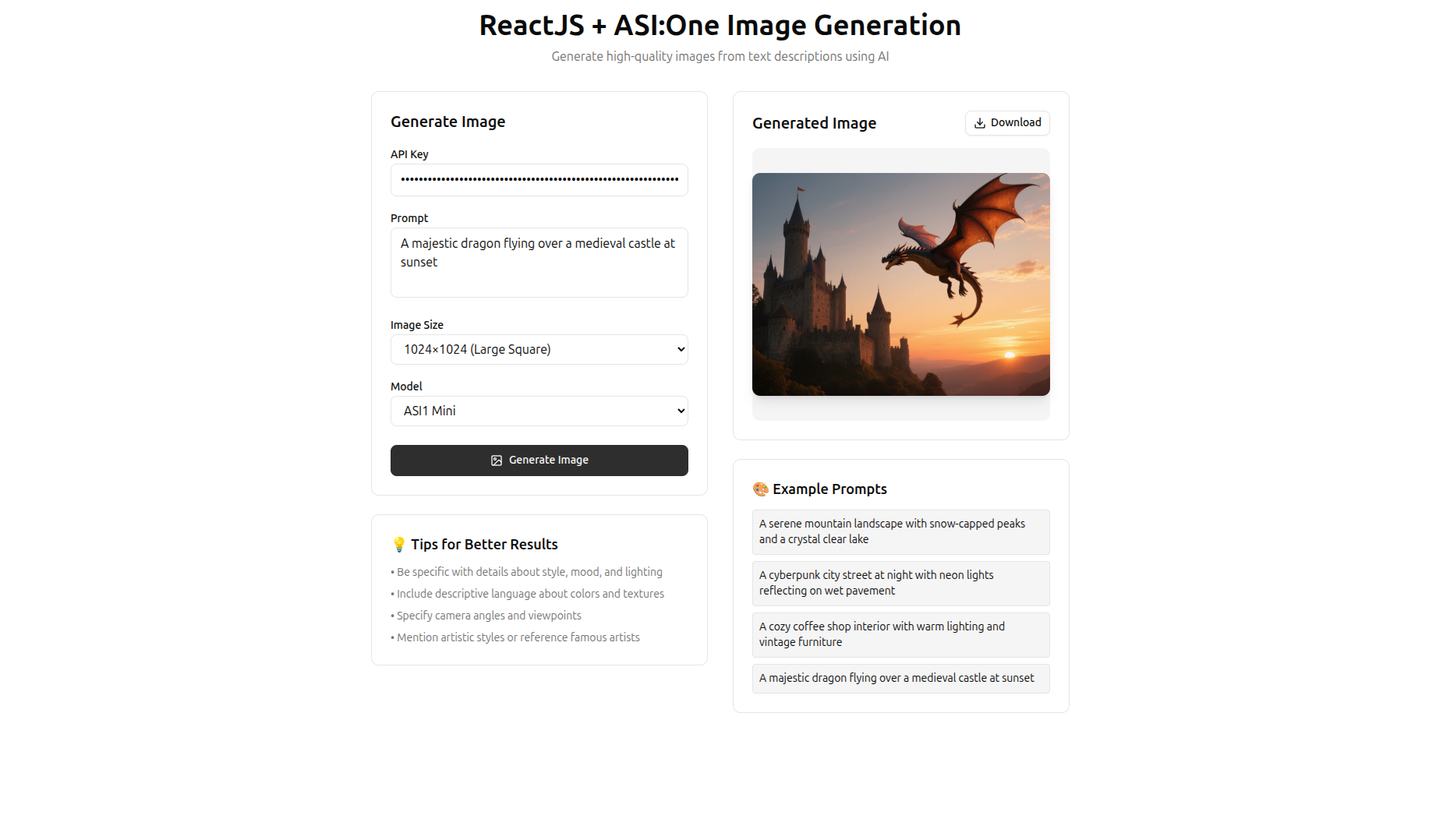
What are we doing in this file?
We are creating a form.
On the left side, we have several inputs:
-
API Key: Allows the user to enter their ASI:One API key to use the app. We do not include our own key in the project, because even if we use a
.envfile, it could still be visible in the browser’s Network tab. -
Prompt: Where the user types what they want to generate.
-
Image Size: The API allows three sizes:
1024x1024,768x768,512x512. -
Model: Currently, only
ASI1 Miniis available.
On the right side, we display:
-
A preview area for the generated image.
-
Buttons with example prompts.
-
A download button once the image is generated.
If you followed the tutorial step by step, you should see something like this:
Conclusion
Done! You’ve learned how to integrate the ASI:One Image Generation API into a modern ReactJS project.
Thank you for following this tutorial 
Español
Desde ASI Alliance LATAM Community
En este tutorial usaremos la API de generación de imágenes de ASI:One, combinada con ReactJS, para generar imágenes mediante prompts.
Esta API, impulsada por ASI:One, nos permite obtener imágenes de alta calidad a partir de descripciones en texto. Para utilizarla en este proyecto, primero debemos inicializar un proyecto de ReactJS usando ViteJS.
También utilizaremos TailwindCSS y Shadcn.
Crear el proyecto con Vite
Ejecuta el siguiente comando:
pnpm create vite
Responde lo siguiente:
-
Project Name: Nombre de tu proyecto
-
Select a framework: React
-
Select a variant: TypeScript
-
Use rolldown-vite (Experimental)?: No
-
Install with pnpm and start now?: Yes
Luego ingresa a tu proyecto:
cd <your-project-name>
Instalar TailwindCSS
Usaremos Tailwind CSS v4. Ejecuta:
pnpm add tailwindcss @tailwindcss/vite
En el archivo vite.config.ts, agrega el plugin de Tailwind para ViteJS:
import { defineConfig } from 'vite'
import react from '@vitejs/plugin-react'
import tailwindcss from '@tailwindcss/vite'

// https://vite.dev/config/
export default defineConfig({
  plugins: [react(), tailwindcss()],
})
Elimina el archivo ./src/App.css.
En ./src/index.css, elimina todo su contenido y deja únicamente:
@import "tailwindcss";
Instalar Shadcn
Para instalar Shadcn, primero edita el archivo tsconfig.json y agrega:
"compilerOptions": {
  "baseUrl": ".",
  "paths": {
    "@/*": ["./src/*"]
  }
}
El archivo completo debe verse así:
{
  "files": [],
  "references": [
    { "path": "./tsconfig.app.json" },
    { "path": "./tsconfig.node.json" }
  ],
  "compilerOptions": {
    "baseUrl": ".",
    "paths": {
      "@/*": ["./src/*"]
    }
  }
}
Luego edita tsconfig.app.json agregando:
"baseUrl": ".",
"paths": {
  "@/*": [
    "./src/*"
  ]
}
Tu archivo debería verse similar a:
{
  "compilerOptions": {
    "tsBuildInfoFile": "./node_modules/.tmp/tsconfig.app.tsbuildinfo",
    "target": "ES2022",
    "useDefineForClassFields": true,
    "lib": ["ES2022", "DOM", "DOM.Iterable"],
    "module": "ESNext",
    "types": ["vite/client"],
    "skipLibCheck": true,

    /* Bundler mode */
    "moduleResolution": "bundler",
    "allowImportingTsExtensions": true,
    "verbatimModuleSyntax": true,
    "moduleDetection": "force",
    "noEmit": true,
    "jsx": "react-jsx",

    /* Linting */
    "strict": true,
    "noUnusedLocals": true,
    "noUnusedParameters": true,
    "erasableSyntaxOnly": true,
    "noFallthroughCasesInSwitch": true,
    "noUncheckedSideEffectImports": true,

    "baseUrl": ".",
    "paths": {
      "@/*": [
        "./src/*"
      ]
    }
  },
  "include": ["src"]
}
Por último, vuelve a editar vite.config.ts:
import path from "path"
import { defineConfig } from 'vite'
import react from '@vitejs/plugin-react'
import tailwindcss from '@tailwindcss/vite'

// https://vite.dev/config/
export default defineConfig({
  plugins: [react(), tailwindcss()],
  resolve: {
    alias: {
      "@": path.resolve(__dirname, "./src"),
    },
  },
})
Inicializar Shadcn
Ejecuta el siguiente comando en la terminal:
pnpm dlx shadcn@latest init
- Which color would you like to use as the base color?: Neutral
Luego agrega el componente button:
pnpm dlx shadcn@latest add button
Crear página App.tsx
Reemplaza el contenido de ./src/App.tsx con el siguiente código:
import { useState } from 'react'
import { Button } from './components/ui/button'
import { Loader2, Download, ImageIcon } from 'lucide-react'

interface ImageGenerationResponse {
  status: number
  message: string
  created: number
  images: Array<{
    url: string
  }>
}

function App() {
  const [prompt, setPrompt] = useState('')
  const [size, setSize] = useState('1024x1024')
  const [model, setModel] = useState('asi1-mini')
  const [generatedImage, setGeneratedImage] = useState<string | null>(null)
  const [isLoading, setIsLoading] = useState(false)
  const [error, setError] = useState<string | null>(null)
  const [apiKey, setApiKey] = useState('')

  const generateImage = async () => {
    if (!prompt.trim()) {
      setError('Please enter a prompt')
      return
    }

    if (!apiKey.trim()) {
      setError('Please enter your API key')
      return
    }

    setIsLoading(true)
    setError(null)
    setGeneratedImage(null)

    try {
      const response = await fetch('https://api.asi1.ai/v1/image/generate', {
        method: 'POST',
        headers: {
          'Content-Type': 'application/json',
          'Authorization': `Bearer ${apiKey}`,
        },
        body: JSON.stringify({
          prompt: prompt,
          size: size,
          model: model,
        }),
      })

      if (!response.ok) {
        throw new Error(`HTTP error! status: ${response.status}`)
      }

      const result: ImageGenerationResponse = await response.json()

      if (result.images && result.images.length > 0) {
        const imageUrl = result.images[0].url
        if (imageUrl.startsWith('data:image/')) {
          setGeneratedImage(imageUrl)
        } else {
          throw new Error('Unexpected image URL format')
        }
      } else {
        throw new Error('No images found in response')
      }
    } catch (err) {
      setError(err instanceof Error ? err.message : 'An error occurred')
    } finally {
      setIsLoading(false)
    }
  }

  const downloadImage = () => {
    if (!generatedImage) return

    const base64Data = generatedImage.split(',')[1]
    const imageData = atob(base64Data)
    const arrayBuffer = new ArrayBuffer(imageData.length)
    const uint8Array = new Uint8Array(arrayBuffer)

    for (let i = 0; i < imageData.length; i++) {
      uint8Array[i] = imageData.charCodeAt(i)
    }

    const blob = new Blob([uint8Array], { type: 'image/png' })
    const url = URL.createObjectURL(blob)

    const link = document.createElement('a')
    link.href = url
    link.download = `generated-image-${Date.now()}.png`
    document.body.appendChild(link)
    link.click()
    document.body.removeChild(link)
    URL.revokeObjectURL(url)
  }

  const sizeOptions = [
    { value: '1024x1024', label: '1024×1024 (Large Square)' },
    { value: '768x768', label: '768×768 (Medium Square)' },
    { value: '512x512', label: '512×512 (Small Square)' },
  ]

  const modelOptions = [
    { value: 'asi1-mini', label: 'ASI1 Mini' },
  ]

  return (
    <div className="min-h-screen bg-background p-4">
      <div className="max-w-4xl mx-auto">
        <div className="text-center mb-8">
          <h1 className="text-4xl font-bold text-foreground mb-2">
            ReactJS + ASI:One Image Generation
          </h1>
          <p className="text-muted-foreground">
            Generate high-quality images from text descriptions using AI
          </p>
        </div>

        <div className="grid grid-cols-1 lg:grid-cols-2 gap-8">
          <div className="space-y-6">
            <div className="bg-card p-6 rounded-lg border">
              <h2 className="text-xl font-semibold mb-4 text-card-foreground">
                Generate Image
              </h2>

              <div className="space-y-2 mb-4">
                <label htmlFor="apiKey" className="text-sm font-medium text-card-foreground">
                  API Key
                </label>
                <input
                  id="apiKey"
                  type="password"
                  value={apiKey}
                  onChange={(e) => setApiKey(e.target.value)}
                  placeholder="Enter your ASI:One API key"
                  className="w-full px-3 py-2 bg-background border border-input rounded-md focus:outline-none focus:ring-2 focus:ring-ring focus:border-transparent"
                />
              </div>

              <div className="space-y-2 mb-4">
                <label htmlFor="prompt" className="text-sm font-medium text-card-foreground">
                  Prompt
                </label>
                <textarea
                  id="prompt"
                  value={prompt}
                  onChange={(e) => setPrompt(e.target.value)}
                  placeholder="A futuristic city skyline at sunset with flying cars"
                  rows={3}
                  className="w-full px-3 py-2 bg-background border border-input rounded-md focus:outline-none focus:ring-2 focus:ring-ring focus:border-transparent resize-none"
                />
              </div>

              <div className="space-y-2 mb-4">
                <label htmlFor="size" className="text-sm font-medium text-card-foreground">
                  Image Size
                </label>
                <select
                  id="size"
                  value={size}
                  onChange={(e) => setSize(e.target.value)}
                  className="w-full px-3 py-2 bg-background border border-input rounded-md focus:outline-none focus:ring-2 focus:ring-ring focus:border-transparent"
                >
                  {sizeOptions.map((option) => (
                    <option key={option.value} value={option.value}>
                      {option.label}
                    </option>
                  ))}
                </select>
              </div>

              <div className="space-y-2 mb-6">
                <label htmlFor="model" className="text-sm font-medium text-card-foreground">
                  Model
                </label>
                <select
                  id="model"
                  value={model}
                  onChange={(e) => setModel(e.target.value)}
                  className="w-full px-3 py-2 bg-background border border-input rounded-md focus:outline-none focus:ring-2 focus:ring-ring focus:border-transparent"
                >
                  {modelOptions.map((option) => (
                    <option key={option.value} value={option.value}>
                      {option.label}
                    </option>
                  ))}
                </select>
              </div>

              <Button
                onClick={generateImage}
                disabled={isLoading}
                className="w-full"
                size="lg"
              >
                {isLoading ? (
                  <>
                    <Loader2 className="w-4 h-4 animate-spin" />
                    Generating...
                  </>
                ) : (
                  <>
                    <ImageIcon className="w-4 h-4" />
                    Generate Image
                  </>
                )}
              </Button>

              {error && (
                <div className="mt-4 p-3 bg-destructive/10 border border-destructive/20 rounded-md">
                  <p className="text-destructive text-sm">{error}</p>
                </div>
              )}
            </div>

            <div className="bg-card p-6 rounded-lg border">
              <h3 className="text-lg font-semibold mb-3 text-card-foreground">
                💡 Tips for Better Results
              </h3>
              <ul className="space-y-2 text-sm text-muted-foreground">
                <li>• Be specific with details about style, mood, and lighting</li>
                <li>• Include descriptive language about colors and textures</li>
                <li>• Specify camera angles and viewpoints</li>
                <li>• Mention artistic styles or reference famous artists</li>
              </ul>
            </div>
          </div>

          <div className="space-y-6">
            <div className="bg-card p-6 rounded-lg border min-h-[400px]">
              <div className="flex justify-between items-center mb-4">
                <h2 className="text-xl font-semibold text-card-foreground">
                  Generated Image
                </h2>
                {generatedImage && (
                  <Button
                    onClick={downloadImage}
                    variant="outline"
                    size="sm"
                  >
                    <Download className="w-4 h-4" />
                    Download
                  </Button>
                )}
              </div>

              <div className="flex items-center justify-center min-h-[350px] bg-muted rounded-lg">
                {isLoading ? (
                  <div className="text-center">
                    <Loader2 className="w-8 h-8 animate-spin mx-auto mb-2 text-muted-foreground" />
                    <p className="text-muted-foreground">Generating your image...</p>
                  </div>
                ) : generatedImage ? (
                  <img
                    src={generatedImage}
                    alt="Generated image"
                    className="max-w-full max-h-full object-contain rounded-lg shadow-lg"
                  />
                ) : (
                  <div className="text-center">
                    <ImageIcon className="w-12 h-12 mx-auto mb-2 text-muted-foreground" />
                    <p className="text-muted-foreground">
                      Your generated image will appear here
                    </p>
                  </div>
                )}
              </div>
            </div>

            <div className="bg-card p-6 rounded-lg border">
              <h3 className="text-lg font-semibold mb-3 text-card-foreground">
                🎨 Example Prompts
              </h3>
              <div className="space-y-2">
                {[
                  "A serene mountain landscape with snow-capped peaks and a crystal clear lake",
                  "A cyberpunk city street at night with neon lights reflecting on wet pavement",
                  "A cozy coffee shop interior with warm lighting and vintage furniture",
                  "A majestic dragon flying over a medieval castle at sunset",
                ].map((examplePrompt, index) => (
                  <button
                    key={index}
                    onClick={() => setPrompt(examplePrompt)}
                    className="text-left w-full p-2 text-sm bg-muted hover:bg-muted/80 rounded border transition-colors"
                  >
                    {examplePrompt}
                  </button>
                ))}
              </div>
            </div>
          </div>
        </div>
      </div>
    </div>
  )
}

export default App
¿Qué estamos haciendo en este archivo?
Estamos creando un formulario.
En el lado izquierdo, tenemos varios inputs:
-
API Key: Para que el usuario introduzca su clave de ASI:One y pueda usar la app. No la incluimos en el proyecto, ya que aunque usemos un archivo
.env, podría verse en la pestaña Network del navegador. -
Prompt: Donde el usuario escribe lo que desea generar.
-
Image Size: La API permite tres tamaños:
1024x1024,768x768,512x512. -
Model: Actualmente solo está disponible
ASI1 Mini.
En el lado derecho, mostramos:
-
Un cuadro para previsualizar la imagen generada.
-
Botones con ejemplos de prompts.
-
Un botón para descargar la imagen generada.
Si has seguido el tutorial paso a paso, deberías ver algo como esto:
Conclusión
¡Listo! Has aprendido a integrar la API de ASI:One Image Generation en un proyecto moderno de ReactJS.
Gracias por seguir este tutorial